Distribute UXM Web Edge (Chromium) extension from Chrome Web Store
1. Distribute via Group Policy (GPO)
Download the Edge Administrative Templates from here: <https://www.microsoft.com/en-us/edge/business/download\>
For Windows devices that aren't joined to a Microsoft Active Directory domain, forced installation is limited to extensions available in the Microsoft Store.
See Distribute UXM Web Edge (Chromium) extension.
You will need to modify "Control which extensions are installed silently" under Computer Configuration -> Policies -> Administrative Templates * -> Microsoft Edge -> Extensions
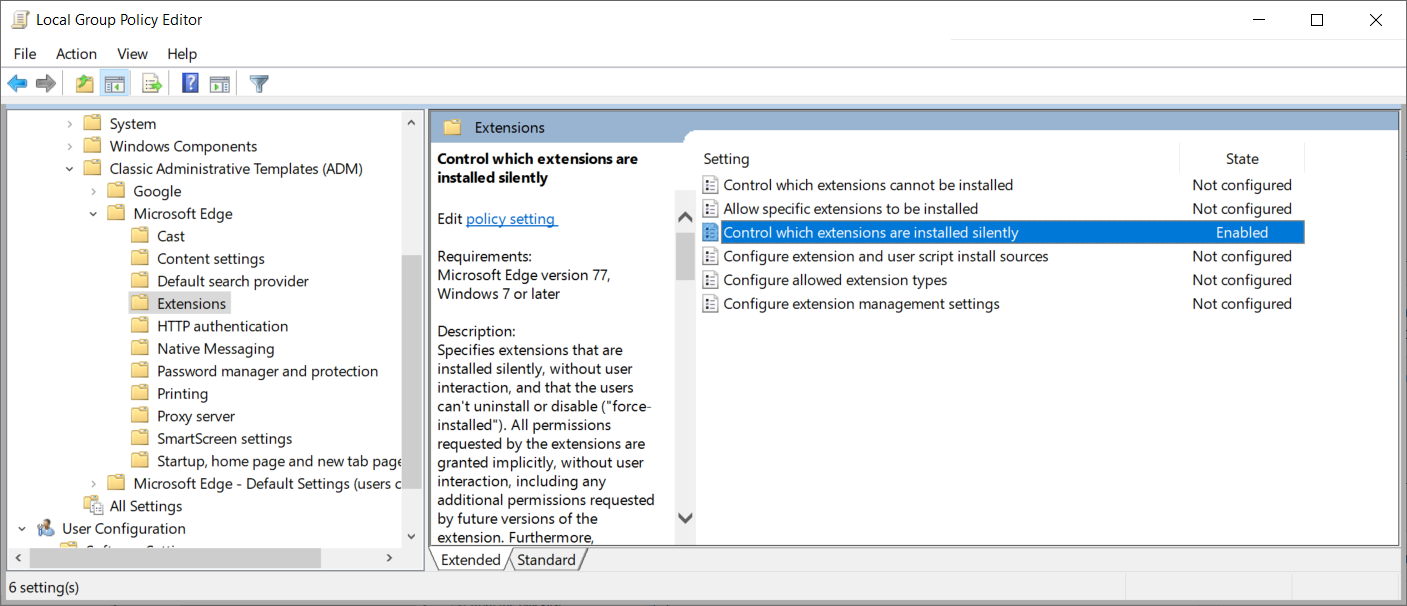
Set it to enabled and add our extension to the list of forced extensions, our UXM Web extension is called:
iilkkemeagoeimfiklijgaeblnfpknlk;https://clients2.google.com/service/update2/crx

Afterwards open <https://chrome.google.com/webstore/detail/uxm-web-performance-monit/iilkkemeagoeimfiklijgaeblnfpknlk>\ in Edge and press "Add to Chrome", please note that settings will have to be added manually if UXM Desktop agent isn't installed.
